Proudly Canadian and First Responder Owned, Fast Shipping, Old Fashioned Customer Service!
HT32
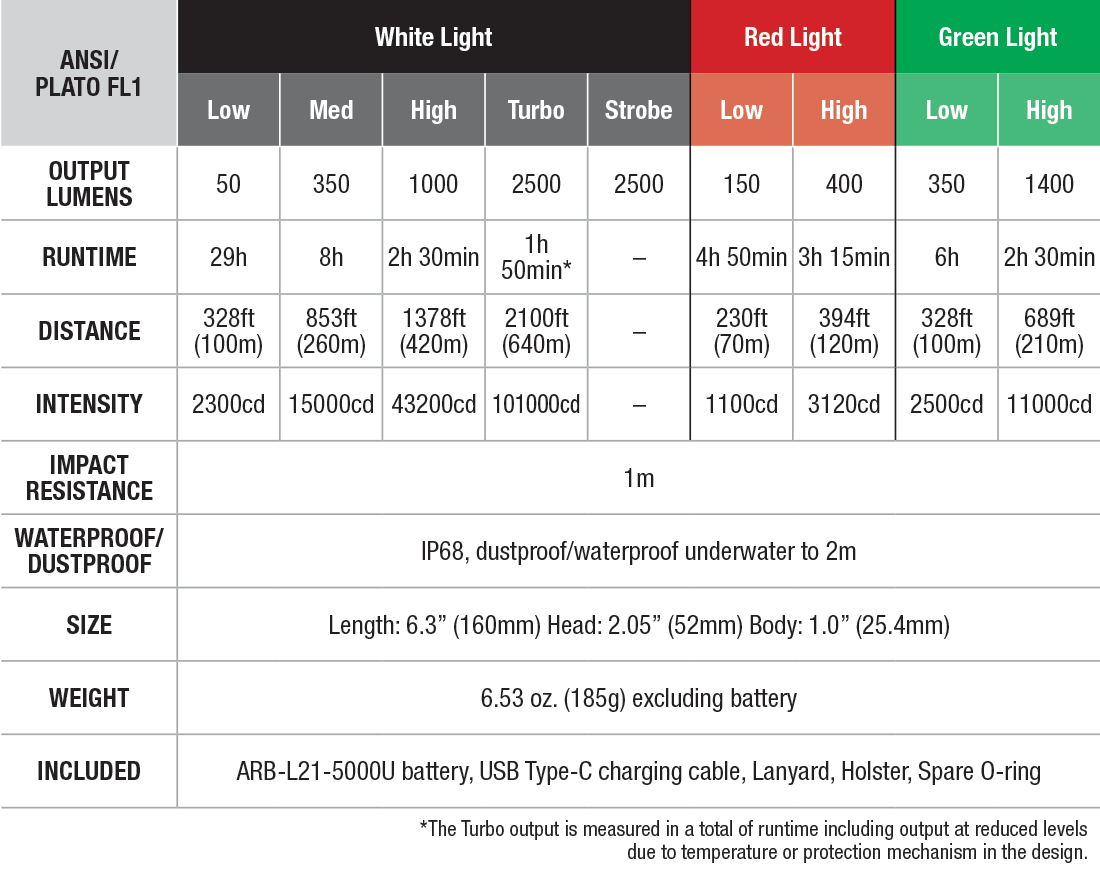
The Fenix HT32 Flashlight is the gear you need for your next hunt or outdoor adventure. Boasting up to 2500 lumens of bright white light, this flashlight also features red or green LEDs—perfect for preserving night vision or not spooking prey. Its dual-switch controls make it easy to switch between colors and adjust light levels. With an extremely long throw, IP68 waterproof rating, and a rechargeable 21700 li-ion battery included, this flashlight makes choosing the right light a key to success.

On/off
Tap the tactical switch to momentarily turn on the light, release it and the light will go out. Fully press the tactical switch to constantly turn on the light, fully press again to turn off the flashlight.
Output Selection
White Light mode: With the white light switched on, single click the functional switch to cycle through Low→Med→High→Turbo.
Red/Green light mode: With the red/green light switched on, single click the functional switch to cycle through Low→High.
Mode switching
With the light switched on, press and hold the functional switch to cycle through White Light mode→Red Light mode→Green Light mode.
Strobe
With the light switched off, press the functional switch to enter Strobe, release it and the light will go out.
Intelligent Memory Circuit
The light memorizes the last selected output, excluding strobe. When turned on again, the previously used output will be recalled.
Battery Specifications
On/off
Tap the tactical switch to momentarily turn on the light, release it and the light will go out. Fully press the tactical switch to constantly turn on the light, fully press again to turn off the flashlight.
Output Selection
White Light mode: With the white light switched on, single click the functional switch to cycle through Low→Med→High→Turbo.
Red/Green light mode: With the red/green light switched on, single click the functional switch to cycle through Low→High.
Mode switching
With the light switched on, press and hold the functional switch to cycle through White Light mode→Red Light mode→Green Light mode.
Strobe
With the light switched off, press the functional switch to enter Strobe, release it and the light will go out.
Intelligent Memory Circuit
The light memorizes the last selected output, excluding strobe. When turned on again, the previously used output will be recalled.
Battery Specifications
|
Type |
Dimensions |
Nominal Voltage |
Usability |
|
|
Fenix ARB- L21-5000 V2.0 |
21700 |
3.6 V |
Recommended |
√√ |
|
Fenix ARB- L21-5000U |
21700 |
3.6 V |
Recommended |
√√ |
|
Fenix ARB- L21-4000P |
21700 |
3.6 V |
Recommended |
√√ |
|
Other types of Li-ion battery |
21700 |
3.6 V |
Caution* |
! |
*21700 Li-ion batteries are powerful cells designed for commercial applications and must be treated with caution and handled with care. Only using quality batteries with circuit protection will reduce the potential for combustion or explosion; cell damage or short circuiting are considered user induced damage and are not covered by any Fenix warranty or liability.
Battery Replacement
Unscrew the tail cap and insert the battery with the anode side (+) towards the light head, then screw the tail cap back on.
Intelligent Overheat Protection
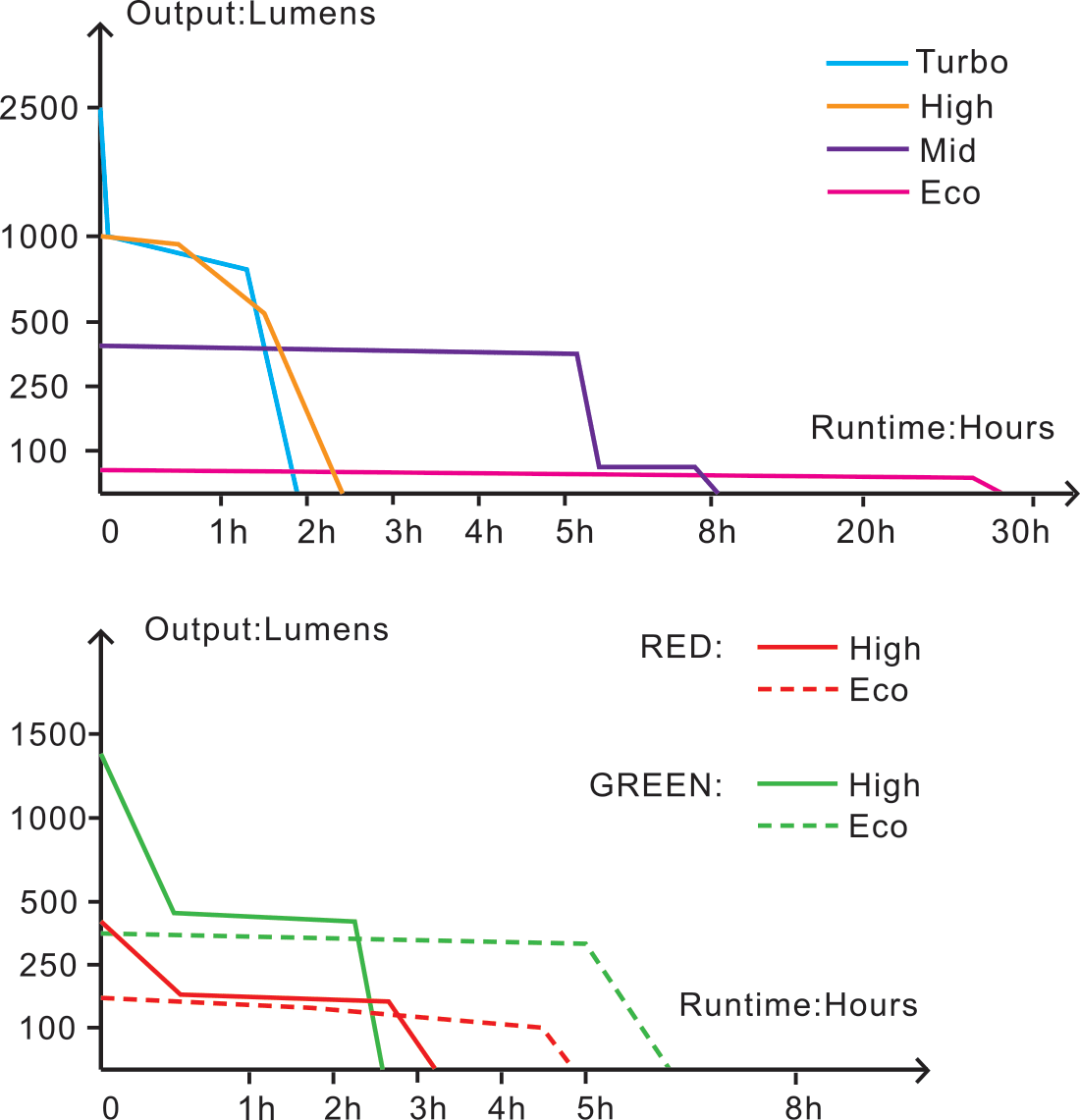
The light will accumulate a lot of heat when used at high output levels for extended periods. When the light reaches a temperature of 65°C/149°F or above, the light will automatically step down a few lumens to reduce the temperature. When the temperature drops below 65°C/149°F, it will then gradually return to the standard output level.
Low-voltage Warning
When the voltage level drops below the preset level, the flashlight is programmed to downshift to a lower brightness level until Low output is reached. When this brightness level is reached (Low output), the light blinks 3 times every 5 minutes to remind users to recharge or replace the battery.
Note: This feature only works with a Fenix ARB-L21 series rechargeable battery.
Usage and Maintenance
If the above methods don't work, please contact your authorized distributor.
Warning
What kind of LED is used in HT32? Does Fenix offer to replace LED?
A: HT32 uses a Luminus SFT70 white LED, SFT20 RA red LED and SFT20 CG green LED;
Fenix does not provide LED replacement services for the time being, and users are not recommended to replace the LEDs independently, which may affect product performance and cause product damage.
What is the color temperature of HT32?
A: Around 6500K.
What is the working voltage of HT32?
A: Voltage: 3.0 V - 4.2 V.
Is HT32 rechargeable?
A: Yes, the included ARB-L21-5000U battery can be charged via the USB Type-C charging cable. The HT32 flashlight does not support charging.
How to prevent accidental activation of the HT32?
A: Unscrew the light tail, or remove the battery to prevent accidental activation.
Why does the HT32 downshift to a lower mode after being used for a while and the higher mode cannot be selected?
A: There are two possible reasons:
1. Intelligent Overheat Protection
The flashlight will accumulate a lot of heat when used at high output levels for extended periods. When the light reaches a temperature of 65°C or above, the light will automatically step down a few lumens to reduce the temperature.
2. Low-voltage Warning
When the voltage level drops below the preset level, the flashlight is programmed to downshift to a lower brightness level until the Low mode is reached.
Why does the HT32 happen to flicker?
A: Reasons that may cause the light to flicker, shine intermittently or even fail to illuminate:
1. Poor battery level.
Solution: Recharge or replace the battery.
2. The contact or contact point of the battery or flashlight is dirty.
Solution: Clean the contact points with a cotton swab soaked in rubbing alcohol.
If the above methods don't work, please contact your authorized distributor.
Q8. What kind of battery can be used in HT32?
A: It is recommended to use a Fenix ARB-L21 Series battery :
Fenix ARB-L21-4000P/Fenix ARB-L21-5000U/Fenix ARB-L21-5000 V2.0.
Q9. What are the optional accessories for HT32?
A: They are listed below:
ALG-06 M-Lok rail clamp for remote pressure switch
AER-04 Remote pressure switch
AER-05 Remote pressure switch
ALG-00 Rail mount
ALG-16 M-Lok Quick-release rail mount
ALG-18 Rail mount
Q10. What should I do if the HT32 needs repair?
A: