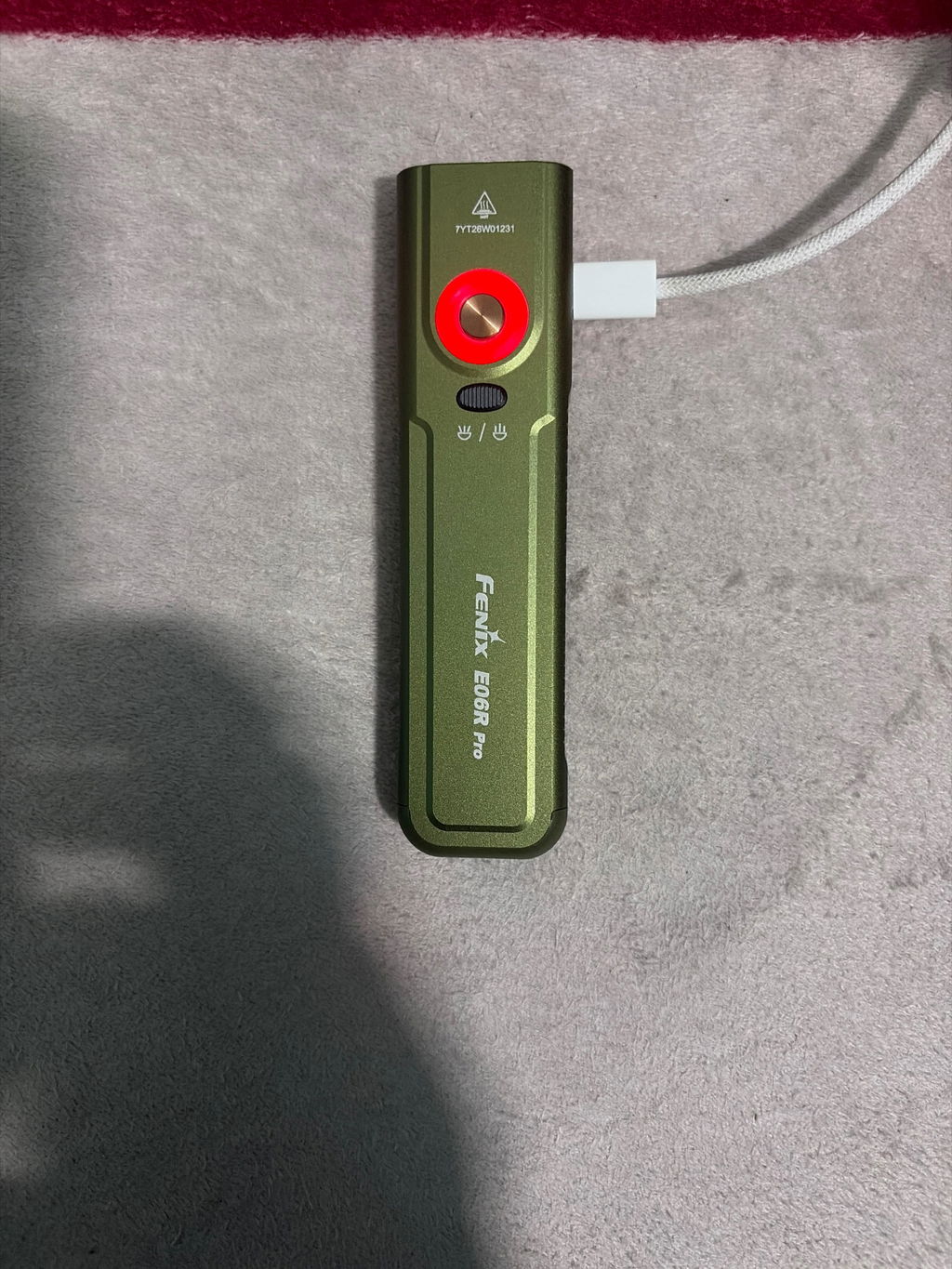
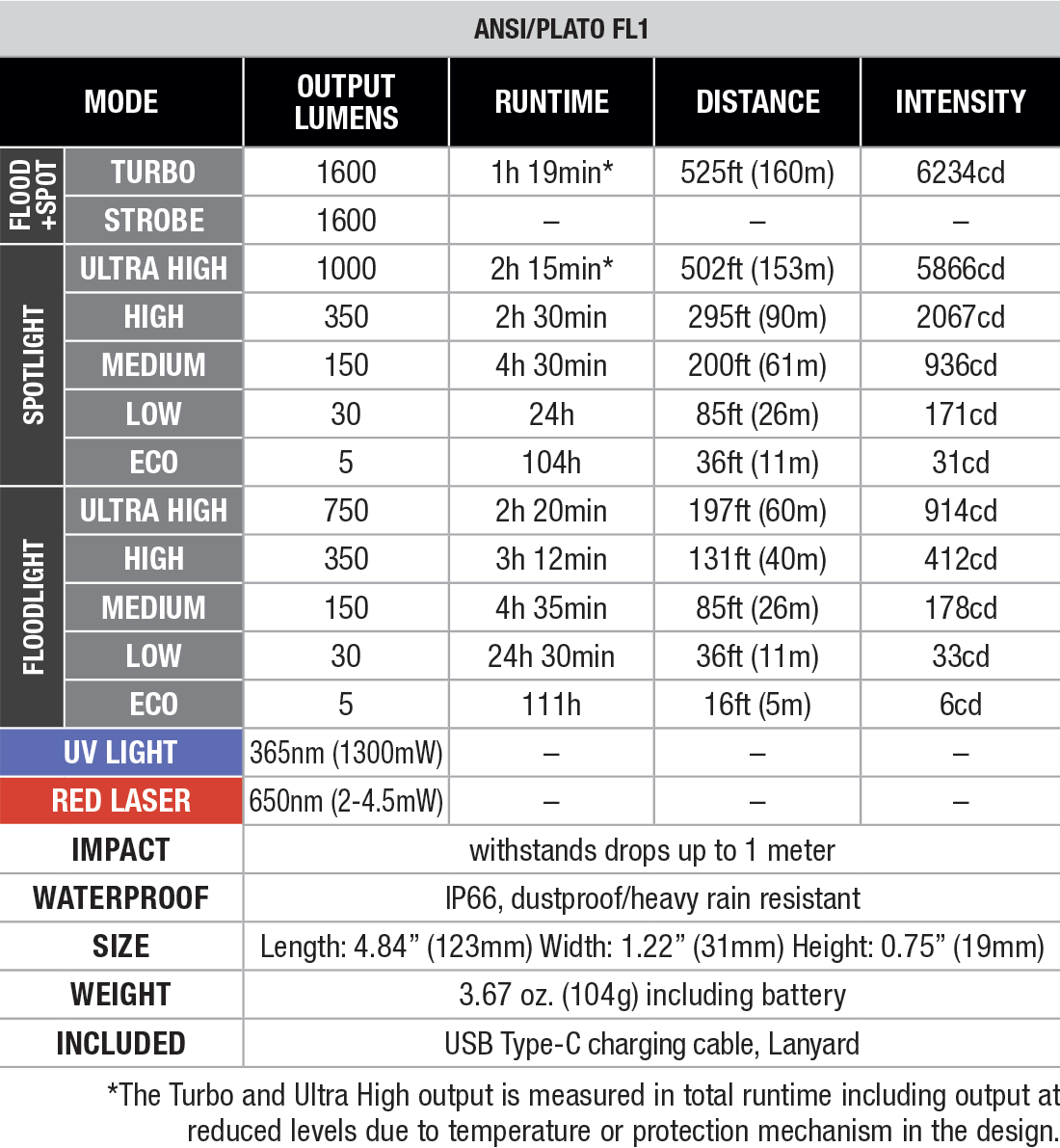
The Fenix E06R PRO Flat Flashlight takes everything you want in an everyday carry flashlight and pushes it one step further. Its spot and flood beams can combine to unleash a 1600 lumen Instant Turbo, giving you the power you need at a moment’s notice. It offers intuitive control through either the independent tail switch or the side switch, all in a sleek, flat-bodied design.
The E06R PRO may be built for everyday practicality, but it’s also packed with extra features to keep you ready for whatever the day brings. Along with five brightness levels for each spotlight and floodlight, it includes a UV light, red laser, strobe, Instant Turbo, and Scene Mode that enables flashing or full-spectrum color on both a ring around the side switch and tail. Built tough, USB-C rechargeable, and available in a variety of colors, the Fenix E06R PRO Flat Flashlight is engineered for those who want everything from their EDC gear.
White light mode
Press and hold the neck-mounted switch/tail switch for 0.5 seconds to turn on the White light mode.
Single click the neck-mounted switch/tail switch to cycle through Eco→Low→Med→High.
Press and hold the neck-mounted switch/tail switch for 0.5 seconds to turn off the White light mode.
Single click the oval switch to select between Spotlight and Floodlight in White light mode.
UV light mode
Press and hold the side purple switch for 0.5 seconds to turn on the UV light, press and hold it for 0.5 seconds again to turn off the flashlight.
In White light mode, press and hold the side purple switch for 0.5 seconds to switch to the UV light, press and hold it for 0.5 seconds again to turn off the flashlight.
Red laser mode
Press and hold the side red switch for 0.5 seconds to turn on the red laser, press and hold it for 0.5 seconds again to turn off the flashlight.
In White light mode, press and hold the side red switch for 0.5 seconds to switch to the red laser, press and hold it for 0.5 seconds again to turn off the flashlight.
Scene mode
With the light turned off, double click the neck-mounted switch to turn on the 3D mood light ring.
Single click the switch to cycle through Red flash→Blue flash→Red & blue flash→RGB→Aurora.
Press and hold the neck-mounted switch for 0.5 seconds to turn off the 3D mood light ring.
Strobe mode
With the light turned off, press and hold the neck-mounted switch for 1.2 seconds to enter Strobe. Press and hold the neck-mounted switch/tail switch for 0.5 seconds to turn off the flashlight.
In White light mode, press and hold the neck-mounted switch for 1.2 seconds to enter Strobe. Single click the neck-mounted switch to recall the previously used output, then press and hold the neck-mounted switch/tail switch for 0.5 seconds to turn off the flashlight.
Turbo mode
With the light turned off, press and hold the tail switch for 0.8 seconds to enter Turbo. Press and hold the neck-mounted switch/tail switch for 0.5 seconds to turn off the flashlight.
In White light mode, press and hold the tail switch for 0.8 seconds to enter Turbo. Single click the tail switch to recall the previously used output, then press and hold the neck-mounted switch/tail switch for 0.5 seconds to turn off the flashlight.
Lock/Unlock
With the light turned off, press and hold the purple switch and the red switch simultaneously for 2 seconds to lock the light. The light will blink twice in Eco output to indicate locked status.
Press and hold the purple switch and the red switch simultaneously for 2 seconds to unlock the light, the light will be unlocked and activate in Moonlight output.
Intelligent Memory Circuit
The flashlight memorizes the last selected output of the White light mode. When turned on again, the previously used output of the White light mode will be recalled.
Turn off the flashlight and connect the USB Type-C end of the charging cable to the flashlight.
The battery level indicator will display red while charging and will turn green when fully charged.
Once charging is completed, be sure to unplug the charging cable.
While charging, if the battery level is below 3.3 V, only the White light mode can be activated; if the battery level is above 3.3 V, the Scene mode and Turbo mode cannot be activated.
With the light turned off, single click the neck-mounted switch to check the current battery level and the battery level indicator will last for 3 seconds.
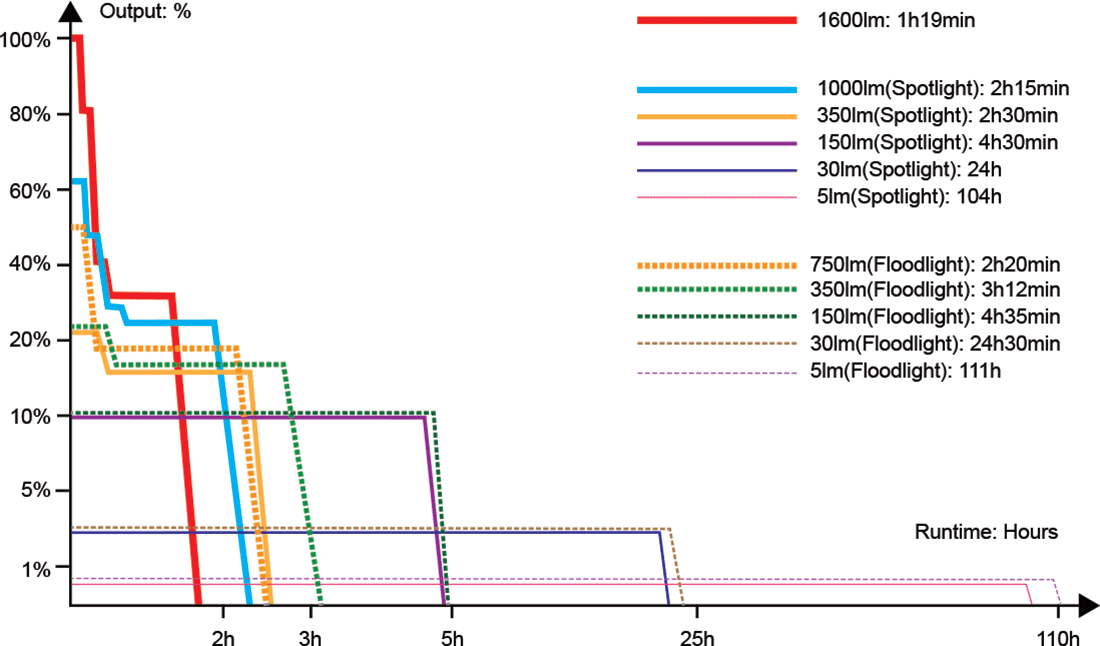
The flashlight will accumulate a lot of heat when used at high output levels for extended periods. When the flashlight reaches a temperature of 60°C/140°F or above, it will automatically step down a few lumens to reduce the temperature. When the temperature drops below 60°C/140°F, the flashlight will gradually recall the preset output level. High output level can be reselected if needed.
When the voltage level drops below the preset level, the flashlight is programmed to downshift to a lower brightness level until Moonlight output is reached. When this happens in Moonlight output, the battery level indicator blinks red to remind users to recharge the flashlight in a timely manner. To ensure normal use, the flashlight will not turn off automatically and will work till the battery runs out.
White light mode
Press and hold the neck-mounted switch/tail switch for 0.5 seconds to turn on the White light mode.
Single click the neck-mounted switch/tail switch to cycle through Eco→Low→Med→High.
Press and hold the neck-mounted switch/tail switch for 0.5 seconds to turn off the White light mode.
Single click the oval switch to select between Spotlight and Floodlight in White light mode.
UV light mode
Press and hold the side purple switch for 0.5 seconds to turn on the UV light, press and hold it for 0.5 seconds again to turn off the flashlight.
In White light mode, press and hold the side purple switch for 0.5 seconds to switch to the UV light, press and hold it for 0.5 seconds again to turn off the flashlight.
Red laser mode
Press and hold the side red switch for 0.5 seconds to turn on the red laser, press and hold it for 0.5 seconds again to turn off the flashlight.
In White light mode, press and hold the side red switch for 0.5 seconds to switch to the red laser, press and hold it for 0.5 seconds again to turn off the flashlight.
Scene mode
With the light turned off, double click the neck-mounted switch to turn on the 3D mood light ring.
Single click the switch to cycle through Red flash→Blue flash→Red & blue flash→RGB→Aurora.
Press and hold the neck-mounted switch for 0.5 seconds to turn off the 3D mood light ring.
Strobe mode
With the light turned off, press and hold the neck-mounted switch for 1.2 seconds to enter Strobe. Press and hold the neck-mounted switch/tail switch for 0.5 seconds to turn off the flashlight.
In White light mode, press and hold the neck-mounted switch for 1.2 seconds to enter Strobe. Single click the neck-mounted switch to recall the previously used output, then press and hold the neck-mounted switch/tail switch for 0.5 seconds to turn off the flashlight.
Turbo mode
With the light turned off, press and hold the tail switch for 0.8 seconds to enter Turbo. Press and hold the neck-mounted switch/tail switch for 0.5 seconds to turn off the flashlight.
In White light mode, press and hold the tail switch for 0.8 seconds to enter Turbo. Single click the tail switch to recall the previously used output, then press and hold the neck-mounted switch/tail switch for 0.5 seconds to turn off the flashlight.
Lock/Unlock
With the light turned off, press and hold the purple switch and the red switch simultaneously for 2 seconds to lock the light. The light will blink twice in Eco output to indicate locked status.
Press and hold the purple switch and the red switch simultaneously for 2 seconds to unlock the light, the light will be unlocked and activate in Moonlight output.
Intelligent Memory Circuit
The flashlight memorizes the last selected output of the White light mode. When turned on again, the previously used output of the White light mode will be recalled.
Turn off the flashlight and connect the USB Type-C end of the charging cable to the flashlight.
The battery level indicator will display red while charging and will turn green when fully charged.
Once charging is completed, be sure to unplug the charging cable.
While charging, if the battery level is below 3.3 V, only the White light mode can be activated; if the battery level is above 3.3 V, the Scene mode and Turbo mode cannot be activated.
With the light turned off, single click the neck-mounted switch to check the current battery level and the battery level indicator will last for 3 seconds.
The flashlight will accumulate a lot of heat when used at high output levels for extended periods. When the flashlight reaches a temperature of 60°C/140°F or above, it will automatically step down a few lumens to reduce the temperature. When the temperature drops below 60°C/140°F, the flashlight will gradually recall the preset output level. High output level can be reselected if needed.
When the voltage level drops below the preset level, the flashlight is programmed to downshift to a lower brightness level until Moonlight output is reached. When this happens in Moonlight output, the battery level indicator blinks red to remind users to recharge the flashlight in a timely manner. To ensure normal use, the flashlight will not turn off automatically and will work till the battery runs out.
White light mode
Press and hold the neck-mounted switch/tail switch for 0.5 seconds to turn on the White light mode.
Single click the neck-mounted switch/tail switch to cycle through Eco→Low→Med→High.
Press and hold the neck-mounted switch/tail switch for 0.5 seconds to turn off the White light mode.
Single click the oval switch to select between Spotlight and Floodlight in White light mode.
UV light mode
Press and hold the side purple switch for 0.5 seconds to turn on the UV light, press and hold it for 0.5 seconds again to turn off the flashlight.
In White light mode, press and hold the side purple switch for 0.5 seconds to switch to the UV light, press and hold it for 0.5 seconds again to turn off the flashlight.
Red laser mode
Press and hold the side red switch for 0.5 seconds to turn on the red laser, press and hold it for 0.5 seconds again to turn off the flashlight.
In White light mode, press and hold the side red switch for 0.5 seconds to switch to the red laser, press and hold it for 0.5 seconds again to turn off the flashlight.
Scene mode
With the light turned off, double click the neck-mounted switch to turn on the 3D mood light ring.
Single click the switch to cycle through Red flash→Blue flash→Red & blue flash→RGB→Aurora.
Press and hold the neck-mounted switch for 0.5 seconds to turn off the 3D mood light ring.
Strobe mode
With the light turned off, press and hold the neck-mounted switch for 1.2 seconds to enter Strobe. Press and hold the neck-mounted switch/tail switch for 0.5 seconds to turn off the flashlight.
In White light mode, press and hold the neck-mounted switch for 1.2 seconds to enter Strobe. Single click the neck-mounted switch to recall the previously used output, then press and hold the neck-mounted switch/tail switch for 0.5 seconds to turn off the flashlight.
Turbo mode
With the light turned off, press and hold the tail switch for 0.8 seconds to enter Turbo. Press and hold the neck-mounted switch/tail switch for 0.5 seconds to turn off the flashlight.
In White light mode, press and hold the tail switch for 0.8 seconds to enter Turbo. Single click the tail switch to recall the previously used output, then press and hold the neck-mounted switch/tail switch for 0.5 seconds to turn off the flashlight.
Lock/Unlock
With the light turned off, press and hold the purple switch and the red switch simultaneously for 2 seconds to lock the light. The light will blink twice in Eco output to indicate locked status.
Press and hold the purple switch and the red switch simultaneously for 2 seconds to unlock the light, the light will be unlocked and activate in Moonlight output.
Intelligent Memory Circuit
The flashlight memorizes the last selected output of the White light mode. When turned on again, the previously used output of the White light mode will be recalled.
Turn off the flashlight and connect the USB Type-C end of the charging cable to the flashlight.
The battery level indicator will display red while charging and will turn green when fully charged.
Once charging is completed, be sure to unplug the charging cable.
While charging, if the battery level is below 3.3 V, only the White light mode can be activated; if the battery level is above 3.3 V, the Scene mode and Turbo mode cannot be activated.
With the light turned off, single click the neck-mounted switch to check the current battery level and the battery level indicator will last for 3 seconds.
The flashlight will accumulate a lot of heat when used at high output levels for extended periods. When the flashlight reaches a temperature of 60°C/140°F or above, it will automatically step down a few lumens to reduce the temperature. When the temperature drops below 60°C/140°F, the flashlight will gradually recall the preset output level. High output level can be reselected if needed.
When the voltage level drops below the preset level, the flashlight is programmed to downshift to a lower brightness level until Moonlight output is reached. When this happens in Moonlight output, the battery level indicator blinks red to remind users to recharge the flashlight in a timely manner. To ensure normal use, the flashlight will not turn off automatically and will work till the battery runs out.
A: Utilizes one Luminus SST20 LED and one Luminus SFT25 LED, with a lifespan of 50,000 hours each.
Fenix does not provide LED replacement services for the time being, and users are not recommended to replace the LEDs independently, which may affect product performance and cause product damage.
A: Spotlight: around 6500K. Floodlight: around 5500K.
A: Fenix Lighting US has its own version that has the name moved above the side switch to allow for a large engraving area on the body.
A: Operating voltage: 2.8 - 4.2 V. Max current: 5.6 A.
A: Yes. The E06R Pro is rechargeable via the USB Type-C charging port. The ring light will display red while charging and will turn green when fully charged.
A: There are two reasons:
Intelligent Overheat Protection
The light will accumulate a lot of heat when used at high output levels for extended periods. When the light reaches a temperature of 60°C/140°F or above, it will automatically step down a few lumens to reduce the temperature.
Low-voltage Warning
When the voltage level drops below the preset level, the flashlight is programmed to downshift to a lower brightness level until the lowest output is reached.
A: The reasons that may cause the light to flicker, shine intermittently or even fail to illuminate:
Poor battery level.
Solution: Recharge the battery.
The contact or contact point of the battery or flashlight is dirty.
Solution: Clean the contact points with a cotton swab soaked in rubbing alcohol.
If the above methods don't work, please contact your authorized distributor.
A: This is a normal optical phenomenon caused by the laser passing through multiple lens layers, which does not affect usage safety or core functions at all. The specific mechanisms are as follows:
This phenomenon does not affect the core functions of laser indication, and it remains fully compliant with Class 3R Laser Safety Standards.
The E06R Pro's red laser is designed for daily portable guidance (e.g., PPT presentations, human-pet interaction), not for high-precision engineering applications (e.g., precise positioning, range finding). For precise positioning in extreme temperature environments (e.g., Arctic expeditions, high-temperature workshops), we recommend using professional-grade laser instruments.
A: The E06R Pro utilizes a built-in 1650mAh battery that is not replaceable.
A: The included key chain ring and lanyard.
A:
Super fast shipping, sweet sticker. Great canadian company to buy from.
Super fast shipping and a sweet sticker. Great canadian store to buy from!
Timely delivered and a good compact flash/spot light.